← Sam Zoloth
Braille

Abstract, sentence 1

Myocardial flow reserve (MFR) integrates rest and stress myocardial blood flow and may identify risk not captured by relative perfusion alone.

The abstract of Braille’s synthetic test paper, one sentence at a time, in your browser’s voice.

iOS prototype · first pilot not yet run

Scientific papers you can listen to, interrupt and question by voice

Braille was built for a retired nuclear cardiologist with progressive vision loss. He used to read his specialty journals himself, and he wants to keep that command of the literature.

Try it

The reading screen, with a question in the middle

This is Braille’s reading screen rebuilt for the web. Start it, interrupt it with a question, and go back to where you were.
Braille Status: Paused

Quantitative PET myocardial flow reserve and two-year cardiovascular outcomes

From the paper, read word for word

In the app, say “keep reading”.

About this paper

  • This paper is synthetic. Its authors and findings are invented for testing.
  • This web preview does not save a reading position. The app saves the paper and the sentence.

Interrupt with a question

In the app you say these.

    Text size

    On the phone

    The same loop in the real app

    A 38-second film with sound. A retired cardiologist is losing his sight, and the papers keep coming. Braille reads them to him on his iPhone, one sentence at a time. Someone asks “What was the hazard ratio?” and the answer comes from the paper’s own sentences. Then “what’s new in my journals?”, “who cited this?” and “get the full text”.
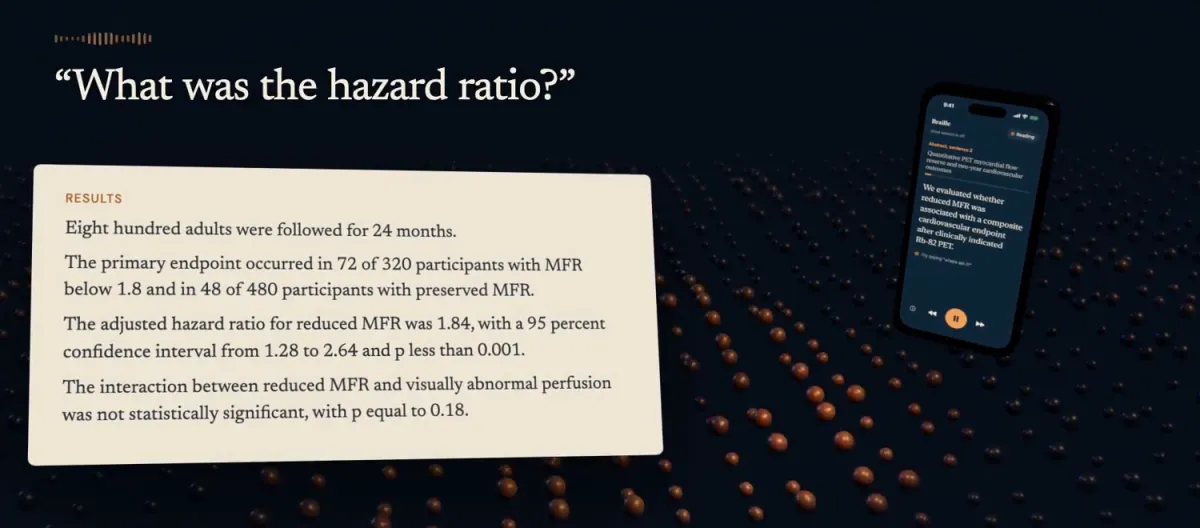
    A frame from the film. Under the question “What was the hazard ratio?”, a card shows four sentences of the synthetic paper, including the adjusted hazard ratio for reduced MFR, 1.84, with a 95 percent confidence interval from 1.28 to 2.64.
    A frame from the film. The card shows the passage around the answer.
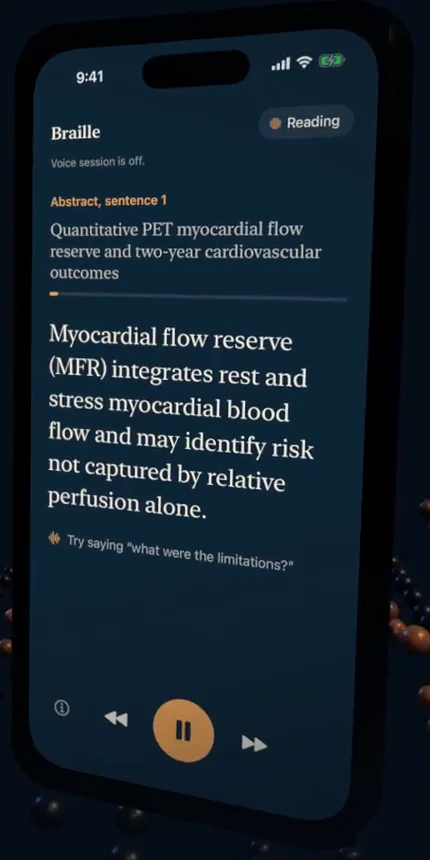
    Braille on an iPhone. A Reading status pill, the line Voice session is off, the position Abstract, sentence 1, the paper title, a thin amber progress bar, the first sentence in large serif type, a hint to try saying “what were the limitations?”, and a dock with details, previous, pause and next.
    The reading screen in the app, from the film.
    What you can say

    The voice does the work. The buttons are a fallback.

    The dock above covers reading. Everything else in Braille is spoken.

    Readkeep reading, go to results, repeat the numbers
    It saves your place. When you reopen the app, the paper waits paused at that sentence. After an interruption it may repeat a sentence rather than skip one you didn’t hear.
    Askwhat was the hazard ratio?, who funded this?
    Braille reads up to three sentences from the paper, word for word, each labelled by section. If the paper has no answer, it says so.
    Keep upwhat’s new in my journals, where does the paper mention flow reserve?
    Follow journals and hear what’s new in them. Ask where a term comes up to hear how often, section by section. Compare two papers, each read under its own title and never merged.
    Follow citationswho cited this?, open reference 12
    Find related papers, hear who cited this one, and open a reference by its number. “Go back to the previous paper” picks it up at the same sentence.
    Tablesread table 2, the MVD row
    Braille reads a table with each value labelled by its column, and answers a row or column lookup straight from the table, with no model in between.
    Say it your wayfaster, go to the end
    Exact phrases act at once. Anything longer goes to a router, which picks one command from the catalog Braille already knows, or hears it as a question about the paper. It runs on the phone where Apple Intelligence is available. Reading speed runs from 0.75 to 2 times.
    Design

    Decisions you just used

    Braille is for someone with low vision who listens first and looks second. Each of these is in the reader at the top of the page.

    The status is a word, not only a color

    The pill reads Reading, Checking the paper or Paused, and VoiceOver hears “Status” and that word. The dot breathes while Braille works and goes still and grey when it pauses.

    Your place is held while you hear an answer

    The answer tray stops below the position line, so “Paused at” stays in view. Closing it returns to the same sentence. Nothing about the answer moves the reading anchor.

    The sentence grows, the dock doesn’t

    The sentence is the only large thing on screen, set in a serif. In the app every size follows Dynamic Type. At the largest sizes the dock stops growing, and holding a dock button shows a magnified label instead.

    Source and saved place wait in a tray

    Where the paper came from, and whether your place is saved, sit behind the details button at the left of the dock. The main screen keeps to the paper.

    Four colors, from the app icon

    The icon is a braille “b” beside sound waves. The reader on this page uses the same four colors.

    • Ink#0F2638
    • Ink raised#173347
    • Ivory#F7EDDB
    • Amber#F2A659
    Sources

    Where every word comes from

    • Speech recognition runs on the iPhone. No microphone audio or transcript is saved.
    • Braille has no server and no accounts. To answer a question, a model picks sentence numbers from the paper and nothing else comes back, so none of the answer’s wording is the model’s. On an iPhone with Apple Intelligence that model runs on the phone. Otherwise the question and the paper’s sentences go from the phone straight to OpenAI, using the listener’s own API key, which stays in the phone’s Keychain.
    • The natural voice is OpenAI’s, and it too runs only with the listener’s own key, so each sentence goes from the phone to OpenAI. Without a key, Apple’s voice reads on the phone.
    • Searching for papers and following journals sends the search words, journal names and paper IDs to PubMed, the U.S. National Library of Medicine’s public service.
    • Each paper says what it is: synthetic, open full text from PubMed Central, or read through the listener’s own publisher access.
    • Braille never sees sign-in details and doesn’t try to get past a publisher’s bot check.
    • The open paper and the saved place stay on the phone, outside iCloud backup. Audio and transcripts are never saved.